
Featured project 13 · Accessibility and visual testing · TypeScript
Accessibility and Visual Regression Testing
Accessibility checks against WCAG 2.2 AA and pixel-exact screenshot comparisons with Playwright and TypeScript, on a small booking app that lives in the repository. A regressed build of the same app carries eight planted defects, and the suite has to catch every one of them.

Purpose
Functional tests let two kinds of bugs through: a page that keyboard, screen reader or zoom users cannot use, and a page that works but looks wrong. This project checks both automatically and proves the checks work: a suite that has only ever been green has not shown that it can fail.
Technology stack
| Area | Tools |
|---|---|
| Language | TypeScript 6 on Node 24 (the app runs as TypeScript directly, no dependencies) |
| Accessibility | @axe-core/playwright with WCAG 2.0/2.1/2.2 A + AA and best-practice rules; keyboard, focus and layout checks written for this project |
| Visual | Playwright toHaveScreenshot, baselines rendered only in the official Playwright Linux image, zero pixel tolerance |
| Tests | 86 Playwright tests (Chromium, Firefox, visual, planted defects) and 28 node:test unit tests |
| CI | GitHub Actions: checks, accessibility in two browsers, visual and defects inside the Playwright image, scan summary in the job summary |
Architecture overview
app/server.ts ── baseline build (port 4310) ──► a11y: axe scans · keyboard · focus · reflow   (must be clean)
      │                                     └─► visual: 21 baselines, 0 px tolerance           (must match)
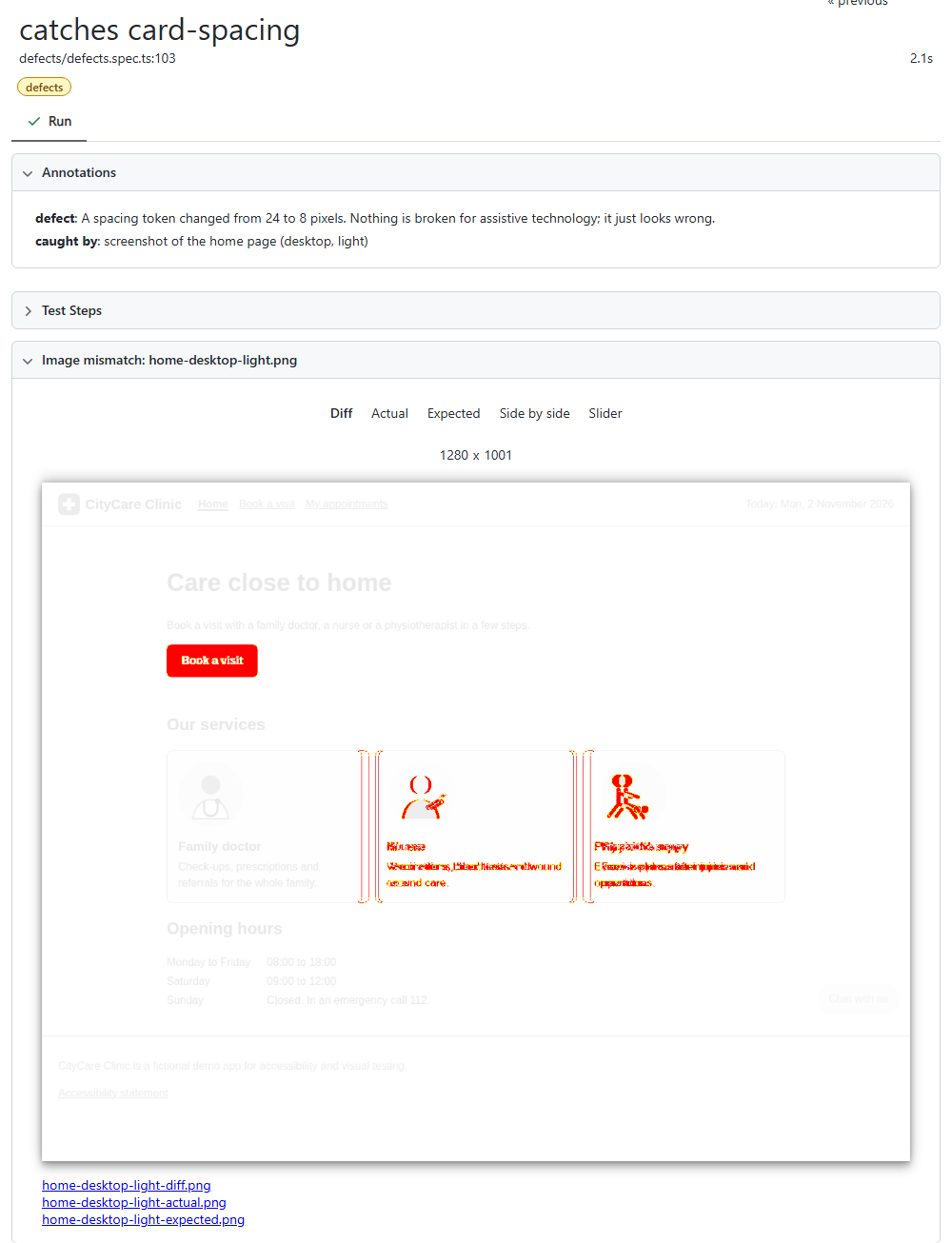
      └─ --variant regressed (8 defects, port 4311) ──► defects: each defect ──► named check ──► expected finding
Key engineering decisions
- States, not only pages: errors shown, confirmation, open dialog, and every page in dark mode
- Keyboard checks return findings instead of asserting, so one implementation proves the good build passes and the broken build fails
- Known issues live in an exceptions file with ticket and expiry date, matched by element; an unused exception fails the build
- Baselines only from the Playwright Linux image (Docker locally, a container job in CI), so any different pixel is a real change
- Each planted defect is an exact-once text replacement; if a refactor removes its text, a unit test fails instead of the defect silently disappearing
Implemented features
- Tab order, visible focus on every stop, skip link, error summary focus, dialog focus trap with Escape and focus return
- Reflow at 320 CSS px, increased text spacing and reduced motion
- Found real problems in its own app: a nearly invisible focus ring in a date field, hidden text widening the page at 320 px, contrast measured mid-animation
- Report with expected, actual and diff images for every changed screenshot
- Markdown scan summary with blocking findings, excused findings and their tickets, and what axe could not decide
- Design notes and 78 interview questions on accessibility and visual testing, linked to the code (Markdown + PDF)
Setup and execution
npm ci
npx playwright install chromium firefox
npm test                 :: everything; screenshots skipped outside Linux
npm run docker           :: everything inside the Playwright Linux image
npm run test:defects     :: every planted defect must be caught
Sample test results
CI workflow
On every push: typecheck, lint, format and unit tests; then the accessibility suite in Chromium and Firefox, and the screenshot comparisons plus the planted-defect checks inside the Playwright image. Each job publishes the scan summary and the HTML report.
Known limitations and future improvements
Limitations
- Automated checks find a part of WCAG issues; screen reader testing and content review stay manual
- Baselines cover Chromium only; a product supporting several browsers would need baselines per browser
Next steps
- Component-level scans
- A screen reader smoke pass documented per release