
Featured project 5 · Python · Keyword-driven
Robot Framework UI + API
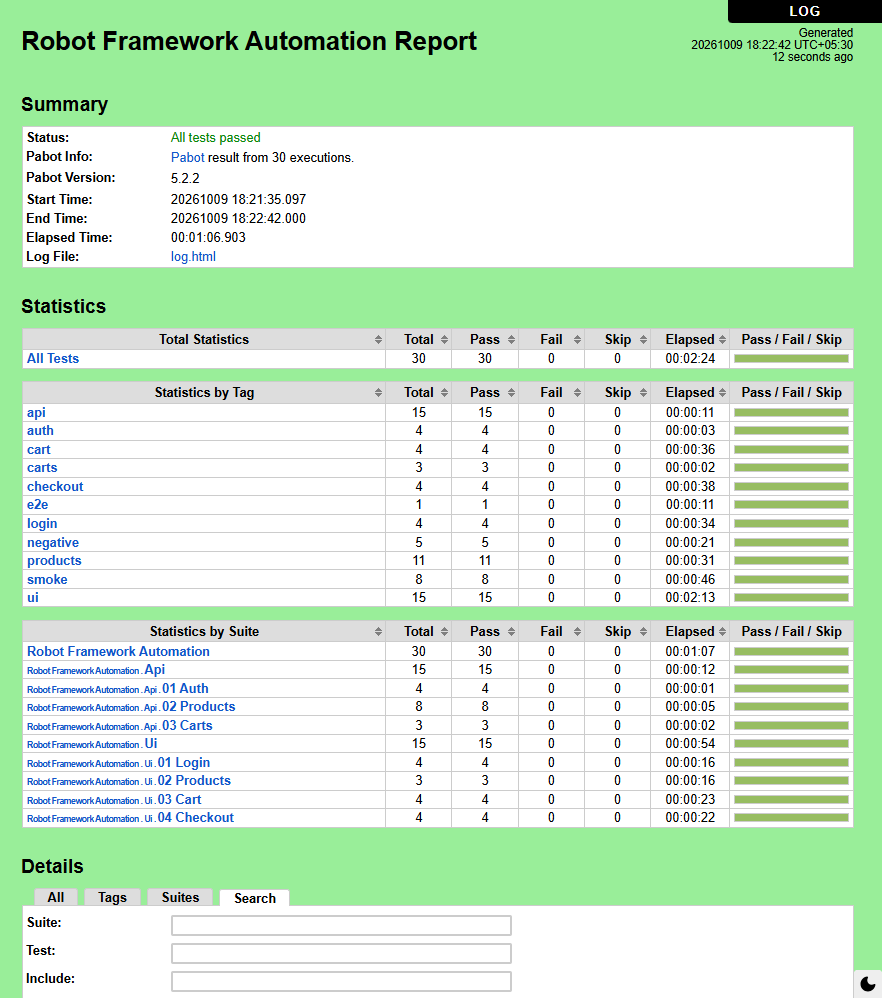
UI and API test automation with Robot Framework 7, SeleniumLibrary and RequestsLibrary on the Page Object Model: 30 tests in about 70 seconds with 4 parallel pabot processes.

Purpose
Shows keyword-driven automation built like maintainable software: the same tool I use at work (Robot Framework + Python), applied to a public demo shop (Sauce Demo) and a public API (DummyJSON).
Technology stack
| Area | Tools |
|---|---|
| Framework | Robot Framework 7 |
| UI | SeleniumLibrary 6.9 |
| API | RequestsLibrary 0.9 |
| Parallel runs | pabot |
| Code quality | Robocop linter (documentation required on every test and keyword) |
| CI | GitHub Actions: lint gate, Chrome and Firefox matrix, nightly run |
Architecture overview
 tests/*.robot           business language, no locators, no HTTP calls
        │
 pages / components      api service objects
 (locators live here)    (URLs and bodies live here)
        │                        │
 common.resource + ShopLibrary.py    ApiSession.resource
        │                        │
   SeleniumLibrary            RequestsLibrary
Key engineering decisions
- Tests never touch a locator, URL path or HTTP verb; a UI or API change is one edit in one resource file
- One page object per screen; shared screen parts (the header) are components
- Action keywords do not assert; check keywords say "Should" (Submit Login Form vs Login Error Message Should Be)
- Python only where Robot syntax is awkward: money with Decimal, sort checks, random test data
Implemented features
- 15 UI tests: login, product list and sorting, cart, checkout with the tax maths
- 15 API tests: auth, products, carts
- Argument files for common, CI and smoke runs; tags for selection
- Keyword names that read like a manual test script, with documentation on every test and keyword
Setup and execution
python -m venv .venv && .venv\Scripts\activate
pip install -r requirements.txt
pabot --processes 4 --testlevelsplit --artifacts png --artifactsinsubfolders \
      --outputdir results -A args/common.args tests
robocop check
Sample test results
CI workflow
Lint first (Robocop and a dry run), then the suite on Chrome and Firefox in parallel with pabot, a pass/fail table in the run summary, and the logs as artifacts; also a nightly run.
Known limitations and future improvements
Limitations
- Runs against public demo sites, whose availability affects results
- No performance tests in this public project (I use rfswarm for that at work)
Next steps
- A small rfswarm load scenario against a self-hosted app
- Libdoc keyword documentation published to GitHub Pages